Find the actual bottleneck
Open Buraq in Elementor. Review the page findings, use X-Ray to locate the affected element, and inspect the relevant assets. Record a mobile baseline before changing anything.

Stop loading what your page does not need. ElementsBoost Pro gives you page-by-page CSS and JavaScript cleanup, lighter local images, and faster-rendering controls—with supported previews and before-and-after benchmarks.
Add lazy loading to reduce the first load weight. +2 pts
Modern image formats can reduce file size. +2 pts
Pro can externalize and defer non-critical CSS. +6 pts
Auto-inject width and height to reduce layout shift. +2 pts
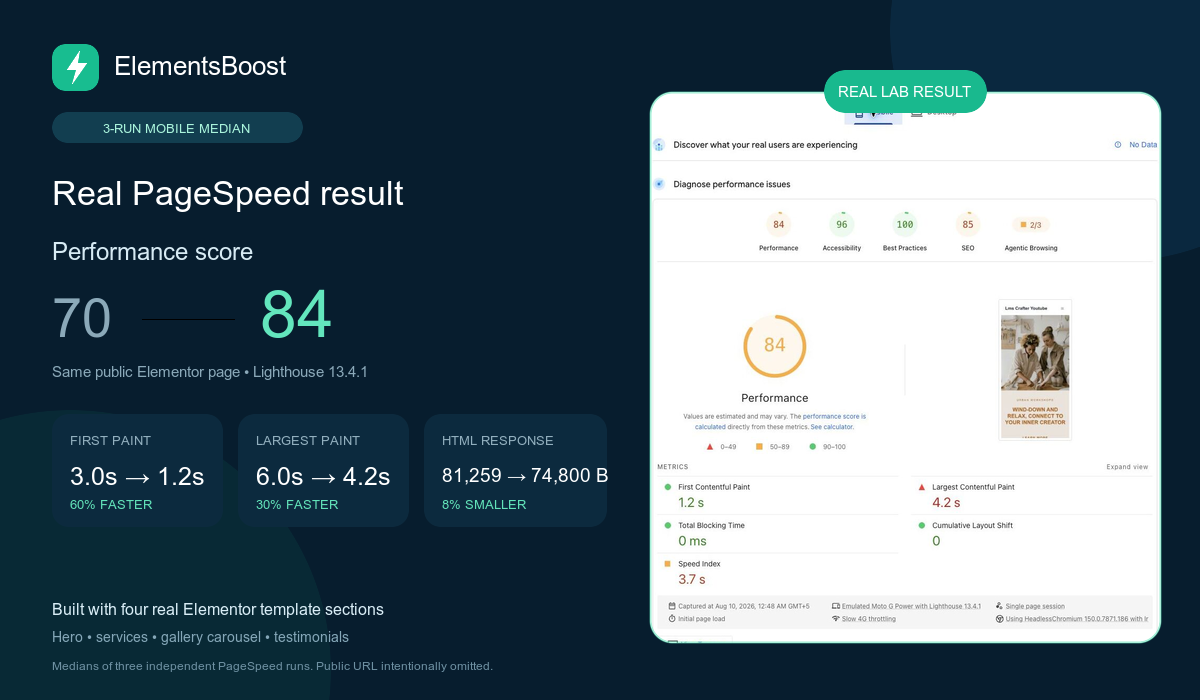
Our published test compared the same public Elementor template using three mobile Lighthouse runs per condition. The median performance score changed from 70 to 84; FCP from 3.0s to 1.2s; and LCP from 6.0s to 4.2s.
These are results from one documented test, not a forecast for your website. LCP in that example still needed improvement. Your starting point, hosting, media and selected optimizations determine what changes.
Open Buraq in Elementor. Review the page findings, use X-Ray to locate the affected element, and inspect the relevant assets. Record a mobile baseline before changing anything.
Choose a supported fix or Pro rule. Preview where supported, then check menus, forms, sliders and responsive layouts. Persistent content edits need their own backup and recovery plan.
After a controlled release, clear the appropriate caches and test the logged-out page. Compare the same device and conditions. Keep the change only when the evidence and functional checks support it.
Test Mode isolates supported frontend controls for logged-in administrators. Public scanners cannot measure that private output. Settings History and Auto-Revert cover supported changes, not every content edit or visual regression.
Read the safe testing and recovery workflow →The Pro MMT Image Engine compresses supported Media Library images and creates eligible WebP or AVIF alternatives using your server. It keeps verified smaller outputs and provides original-file backups and restoration.
Format support depends on your server and source image. Remote media and animated GIF conversion are outside the general promise.
Pro Lean Mode helps remove supported Elementor and addon assets from the pages that do not need them. Safe Preview lets you inspect the candidate result before publishing a rule.
An asset used on another page is not automatically safe to remove everywhere.
Use Pro Critical CSS, dependency-aware JavaScript delay/defer and supported LCP image controls to address the rendering bottleneck your diagnosis identified.
Check desktop and mobile separately. Keep required interactions and consent-dependent scripts working.
Caching can improve delivery while a page still downloads heavy images and unnecessary CSS or JavaScript. ElementsBoost focuses on the Elementor page and its assets, so you can address those remaining costs.
Keep the caching and CDN features you already rely on. Give overlapping jobs—such as JavaScript delay, font handling or image delivery—to one tool at a time, then test the combination. ElementsBoost does not provide a full-page cache or CDN.
Set up a clear cache + ElementsBoost workflow →Review supported asset removals on a specific page before making the rule public.
Compress eligible images, generate verified smaller modern formats and restore originals when needed.
Prepare separate mobile and desktop critical styles for supported pages and verify the rendered result.
Control supported non-critical scripts with dependency awareness and functional testing.
Save comparisons, use matched three-run medians and monitor pages with your own API key.
Review eligible heading and meta actions, and prioritize supported hero-image candidates identified by the page scan.
Free gives you useful diagnostics and supported fixes. Pro adds targeted optimization, local image processing and a stronger measurement workflow.
| What you need | Free | Pro adds |
|---|---|---|
| Page diagnosis | Buraq findings, X-Ray and asset insights | Deep Scan and eligible heading/meta actions |
| Asset cleanup | 14 global controls, profiler and compatibility guidance | Per-page Lean Mode and advanced addon rules |
| Images | Eligible local image dimensions and supported lazy-loading fixes | Local compression, WebP/AVIF, bulk processing and file backups |
| Fonts | Self-host supported Google Fonts | Part of a broader rendering workflow |
| Testing and recovery | Test Mode for supported controls, Settings History and supported Auto-Revert | Safe Preview for supported per-page rules |
| PageSpeed | On-demand Lighthouse checks | Saved history, matched three-run medians and scheduled monitoring |
| Rendering | Diagnostics and guidance | Critical CSS, JavaScript delay/defer and supported LCP controls |
| Support | Community support | Priority support |
Pro includes the Free foundation. Image processing uses server resources and supported local files; there are no external image API credit charges. Preview and recovery coverage depends on the action.
Choose your Pro license → Start with FreeCompress local images, clean up page assets and prioritize the first screen. Every plan unlocks the same tools—choose how many websites you want to optimize.
For your own Elementor website.
$29
per year · 1 site
Get Personal →All Pro features, on your site
For freelancers with a small portfolio.
$69
per year · 5 sites
Get Business →All Pro features, on every licensed site
For teams managing client websites.
$149
per year · 20 sites
Get Agency →All Pro features, on every licensed site
Start with a clearer picture—for free.
Find page issues with Buraq and X-Ray, inspect assets and apply supported fixes.
14-day money-back guarantee. Review license and refund terms before purchase. No external image API fees. Image formats depend on server support; monitoring uses your own API key. Explore all features →
Start with the symptom your visitors experience, then follow the diagnosis, focused fix and verification steps.
No. ElementsBoost works with Elementor Free and Elementor Pro. ElementsBoost Pro is the paid performance extension with the additional capabilities listed above.
Yes. Keep caching and CDN delivery in place. Avoid assigning the same optimization to multiple tools, and test the combination on your actual pages.
No optimizer can promise that. Use supported previews, check important interactions and retain backups. Settings History, Auto-Revert, content undo and image restoration each cover specific actions; none replaces a full site backup.
Free includes Buraq diagnostics, X-Ray, supported fixes such as eligible image dimensions, global controls, supported Google Font self-hosting, on-demand Lighthouse checks and the supported testing/recovery tools.
Choose Pro when your diagnosis calls for per-page asset removal, local image compression and modern formats, Critical CSS, JavaScript controls, or saved and repeatable PageSpeed comparisons.
The Pro image engine processes supported local images on your server. Available formats and compression methods depend on your hosting environment. There are no external image API credit fees.
Results vary. Measure the same page and device before and after, repeat lab runs and test functionality. Lighthouse scores are diagnostic snapshots; real-user Core Web Vitals are a separate measurement.